

A functioning fiber-optic connection involves a long chain of technical steps. Data first travels along public roads through the public network (Network Layer 3) and is then transported via the in-home infrastructure (Network Layer 4) all the way to the front door. But it is only during the final few meters inside the home that this technology becomes visible and usable to users. This area is referred to as Network Layer 5. As a purely user-facing layer, it is where the subscribed service is experienced in everyday life. It is precisely at this interface that, in practice, the perceived quality of a fiber-optic connection is often influenced by conditions at network levels 4 and 5. After all, customers ultimately do not measure a provider’s quality by the cable in the basement, but rather by the performance they experience in their daily use of their devices.
This means that at network level 5, the infrastructure itself becomes the user’s personal experience.
What is NE 5 (Network Level 5)?
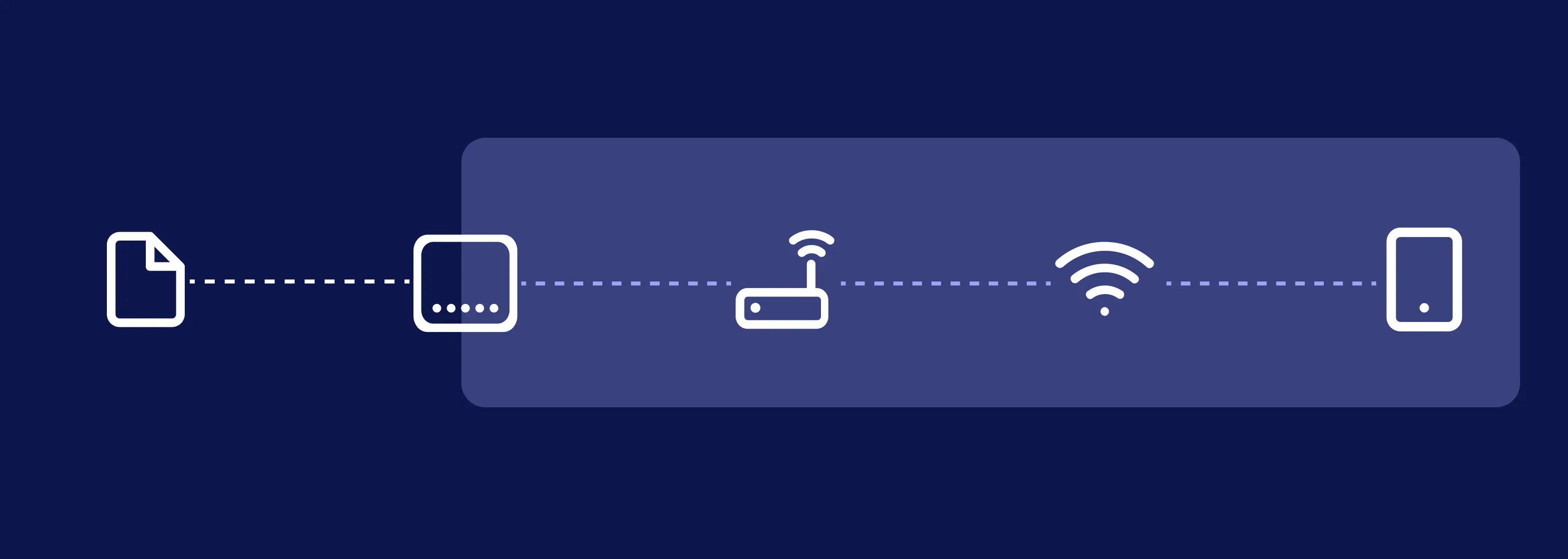
Network Level 5 connects directly to the end of Network Level 4 (NE4). While the cables of the NE4 building network terminate at the fiber-optic subscriber connection box on the wall, Network Level 5 covers the remaining path to the end device. It encompasses the entire private home network within the residence. Everything that is connected by cable or via a wireless connection within the living spaces belongs to this layer. Since this is the residents’ private space, the Internet service provider no longer has direct access to this area.
Which components are part of Network Layer 5?
For the Internet signal to reach the screen, various components in the home must work together. Network Layer 5 often begins at an ONT (Optical Network Termination) or a router with a built-in fiber-optic modem. This component converts the incoming light signals from the fiber-optic cable into electrical signals and serves as the interface for the home network.
The router itself acts as the home’s central control unit, managing the data and forwarding it to individual devices.
Data is transmitted either via a wired connection using network cables or wirelessly via Wi-Fi. While network cables establish a direct connection to individual devices, Wi-Fi transmits data wirelessly throughout the rooms.
At the end of this chain are the end devices, which ultimately access the connection for the users’ applications.
Only when all these components work together seamlessly does the internet connection remain fast and stable from start to finish.
Why is NE 5 crucial to the user experience?
In everyday life, users experience the Internet through the applications on their screens. The entire infrastructure in the background remains invisible, which is why their personal experience with the connection and its perceived quality arise precisely at this final level.
In practice, however, there is often a major misunderstanding at this point. The speed specified in the service plan does not automatically correspond to the actual Wi-Fi speed. While the fiber-optic network delivers high bandwidths flawlessly and without loss all the way to the connection outlet on the wall of the apartment, how much of this performance ultimately reaches the end device is determined by the home network—that is, the router’s performance, the load on the radio frequencies, and physical obstacles within the rooms.
The actual internet quality in everyday use is therefore largely determined by the hardware and conditions at Layer 5 within the home, and not by the network outside on the street.
Common Problems at Network Layer 5
Because every home is set up differently, there are many potential sources of interference at the network level. The most common causes of slow internet are:
- Limited Wi-Fi coverage: Obstacles such as solid reinforced concrete walls, underfloor heating systems, or large mirrored surfaces weaken the wireless signal, so that very little signal reaches rooms far away.
- Incorrect router placement: If the router is placed directly on the floor or behind thick pieces of furniture, the radio waves cannot spread freely throughout the room from the start. An unfavorable placement therefore often significantly reduces the signal’s range. Instead, the ideal location is as central as possible, slightly elevated, and unobstructed within the home.
- Outdated hardware: Older routers, repeaters, or Wi-Fi standards often cannot fully utilize the available bandwidth of modern fiber-optic connections, thereby limiting the actual achievable speed.
- Incorrect configurations: Improperly set up routers, mesh systems, or Wi-Fi extenders can impair network performance. In some cases, poorly configured devices even block the home network instead of improving the connection.
- Device issues: Older devices are often technically incapable of handling modern fiber-optic speeds and therefore slow down the connection. In addition, poorly configured extenders often cause the home network to be blocked rather than expanded. This applies, for example, to older smartphones, tablets, or laptops that do not fully support the available bandwidths.
To help users analyze and resolve such issues, many internet service providers offer self-service tools. MyProvider can help resolve these issues. With the feature for independent Wi-Fi optimization in the home network, users can measure Wi-Fi coverage across their own floor plan and thus determine the optimal location for the router and repeater.
If the connection is still spotty, internet speed can be measured directly in the app. This test takes Wi-Fi coverage and signal strength into account and clearly shows whether the issue lies with the line or the wireless network.
Why are problems in NE 5 often classified incorrectly?
When a video stutters or a website fails to load, users initially see only the obvious symptom: the internet is slow. Since the boundary between the provider’s physical network and their own Wi-Fi is invisible to users, they almost automatically assume the problem lies with the internet provider. In the vast majority of cases, however, the problem isn’t with the fiber-optic line, but rather with the Wi-Fi connection or the devices inside the home. Since this subtle distinction often goes unnoticed in everyday life, the problem is quickly misattributed. Users therefore mistakenly blame the provider, even though the cause lies directly at Layer 5 of their own home network.
Distinction from Network Layer 4
To better understand Layer 5, it helps to look at the preceding Layer 4.
Layer 4 encompasses the infrastructure within the building and extends from the building service point to the fiber-optic subscriber connection box in the apartment.
Network Layer 5 begins at this connection box and encompasses the users’ entire home network—from the ONT or router, through the Wi-Fi, to the connected devices.
While Network Layer 4 transports the data into the apartment, Network Layer 5 determines how this service is actually used and experienced in everyday life.
Conclusion
Network Layer 5 describes the level of actual usage. It is where the provider’s infrastructure meets the reality of the home environment. Network Layer 5 determines how the performance of a fiber-optic connection is actually experienced. Even if the provider’s network operates flawlessly, limitations in the home network can significantly affect perceived quality. For internet service providers, this means that helping users set up and optimize their home networks plays a key role in customer satisfaction and service efficiency.


.svg)

